
Table of Contents
01 Why Environment Damages LED Screens | 02 Air Conditioning Direct Blow | 03 Condensation in Steel Structures | 04 Liquid Damage in KTV & Venues | 05 Indoor Water Curtain Effect | 06 Static Electricity in Dry Areas | 07 Coastal Humidity & Salt Mist | 08 Prevention Checklist | FAQ
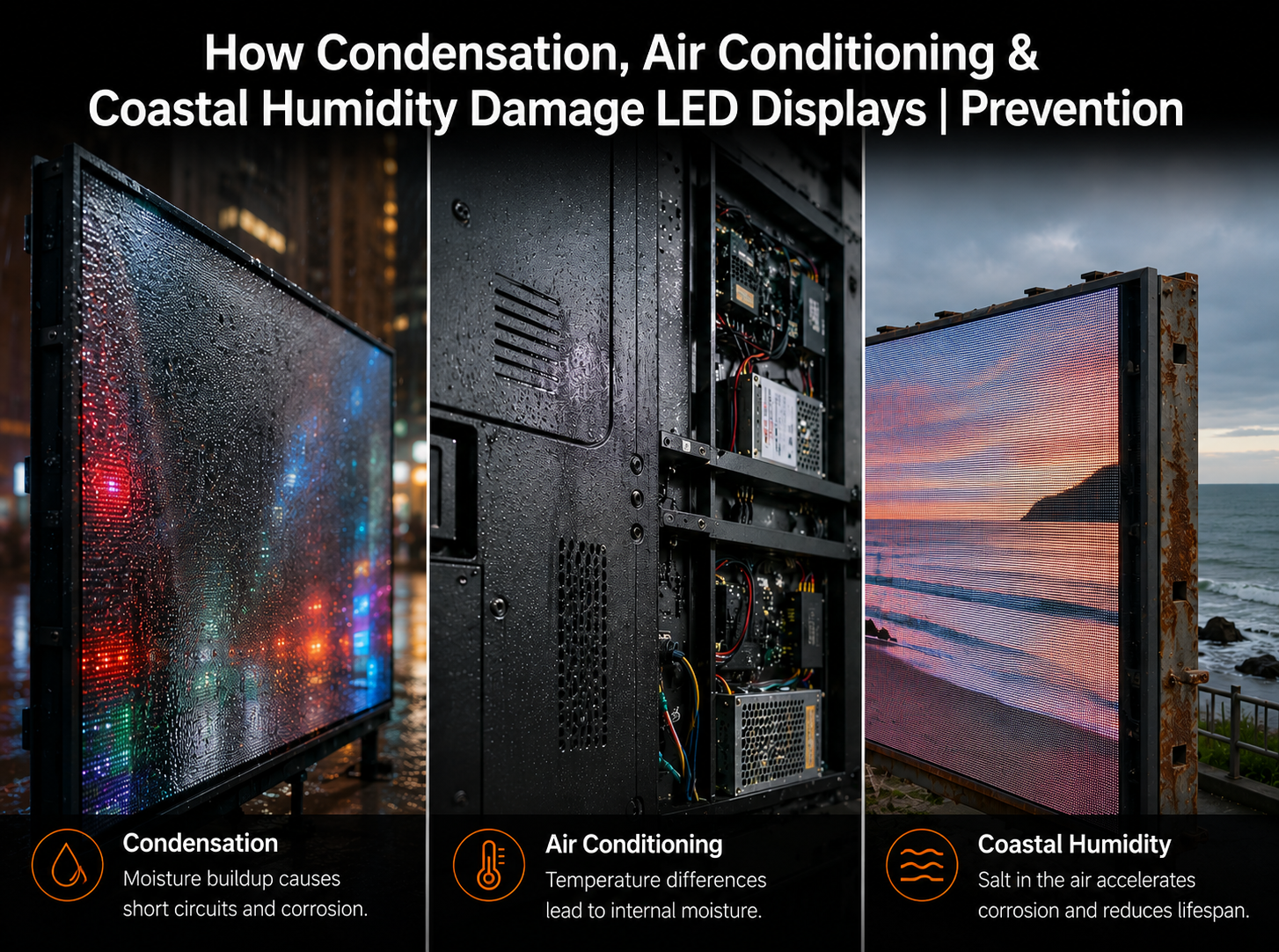
LED displays are now widely used in conference rooms, retail spaces, KTV venues, steel-structure factories, coastal outdoor advertising, control rooms, and commercial buildings. But in real projects, not every failure comes from poor product quality or hardware defects. Many recurring issues — dead pixels, “caterpillar” bright lines, short circuits, module burnouts, power supply failure, receiving card damage, corrosion, and abnormal brightness — are directly related to the operating environment. Air conditioning, condensation, high humidity, salt mist, conductive liquids, static electricity, and poor grounding can all damage LED screens if they are not considered during design, installation, and maintenance. This article explains real-world failure cases and provides practical prevention methods for LED display projects in humid, coastal, dry, and temperature-fluctuating environments.
When an LED display fails, the first reaction is usually to suspect the LED modules, receiving cards, driver ICs, power supplies, or soldering quality. However, in many actual service cases, the root cause is not the display hardware itself, but the environment around the screen. Temperature difference, humidity, condensation, liquid contamination, salt mist, poor ventilation, and static electricity can gradually create electrical and mechanical stress inside the display system.
LED displays are electronic systems with dense circuits, small solder joints, exposed connectors, high-frequency signals, and thousands or even millions of LED chips. This means the screen is sensitive to moisture, leakage current, corrosion, thermal expansion, and electrochemical migration. A failure may appear as a few dead pixels at first, then develop into bright lines, “caterpillar” patterns, module short circuits, power supply damage, or receiving card failure.
LED display reliability is not only determined by product quality. It is the combined result of product design, installation environment, ventilation, humidity control, grounding, waterproofing, and daily maintenance.
One common indoor failure case occurs in conference rooms where the air conditioner outlet blows directly onto the LED display. In one project, the same area of the screen repeatedly developed dead pixels and caterpillar-like bright lines. Technicians repaired the modules several times, but the fault kept returning in exactly the same area. The issue was finally traced to an air-conditioning outlet aimed directly at the screen surface.

The mechanism is straightforward: cold air rapidly lowers the screen surface temperature, while the internal PCB, solder joints, and cabinet structure remain warmer. This temperature imbalance creates thermal expansion and contraction stress. Repeated cycles can cause micro-cracks, PCB deformation, solder joint fatigue, or weak contact between LEDs and pads. At the same time, cold airflow increases the probability of water vapor condensing on or inside the module.
- ▸Thermal stress — rapid cooling creates uneven contraction between LEDs, PCB, solder joints, and cabinet structures.
- ▸Condensation risk — cold surfaces make moisture in the air condense into water droplets, increasing leakage and short-circuit risk.
- ▸Recurring fault zones — if the air outlet always blows toward the same screen area, the same modules will repeatedly fail.
Air-conditioning outlets should never blow directly onto an LED screen. Adjust the airflow direction, install air deflectors, or redesign the air outlet position before long-term operation.
Steel-structure factories and warehouses are another high-risk environment. In one real project, an indoor LED screen was mounted onto the side wall of a steel-structure building. Behind the screen was a steel or plastic-steel wall panel. Shortly after installation, modules, power supplies, and receiving cards began to short-circuit and burn out. The initial suspicion was product quality, but the real cause was condensation.
Steel structures experience large temperature differences between day and night. Metal panels cool down quickly, while humid indoor air remains warm. When warm, moist air contacts a cold steel surface, condensation forms. If the LED screen is mounted close to the steel wall without ventilation, water droplets may appear behind the screen, on cables, inside power boxes, or near connectors. Once moisture reaches energized components, short circuits become highly likely.
- ▸Use sealed power boxes and card boxes — protect power supplies, receiving cards, and signal terminals from direct condensation exposure.
- ▸Route cables from bottom to top — reduce the chance of water following the cable into connectors or electrical boxes.
- ▸Improve ventilation behind the screen — avoid sealed dead spaces where warm humid air accumulates and condenses.
LED screens used in KTV rooms, bars, clubs, and entertainment spaces face a different type of environmental risk: liquid contamination. Drinks such as beer, milk, soft drinks, and even cleaning water may splash onto the LED surface. Some cleaning staff may wipe the screen with a wet cloth or even rinse the surface with tap water. These actions can quickly lead to bright spots, caterpillar lines, abnormal pixels, or module failure.
The problem is not just water itself. Tap water, beverages, and cleaning liquids contain conductive ions, sugars, minerals, or residues. Once they enter LED solder pads, lamp structures, PCB gaps, or connector areas, they may create micro-short circuits. After evaporation, remaining residues may continue absorbing moisture from the air, causing repeated leakage or corrosion.
If any conductive liquid splashes onto an LED screen, power off immediately. Do not continue operation. Clean with professional non-ionic LED screen cleaner, dry completely, ventilate, and only power on after inspection.
In some conference room projects, newly installed LED screens develop a thin fog-like layer on the surface, followed by large areas of dead pixels or caterpillar patterns. In one case, the root cause was not the display module itself, but the combination of high indoor humidity, a cabinet-style air conditioner behind the screen, and inconsistent operation between local and central air conditioning systems.
When temperature differences remain close to or above critical thresholds and relative humidity approaches high levels, condensation may form on the back of LED modules or inside the cabinet. This moisture gradually accumulates and may appear as a “water curtain” effect, damaging LEDs from behind. Even if indoor humidity is below 75%, a large local temperature difference can still trigger condensation.
- ▸Keep local temperature difference under control — avoid large temperature gaps between the front, back, and sides of the LED screen.
- ▸Use dehumidification when humidity is high — once relative humidity approaches 75%, use dehumidifiers or air-conditioning dry mode.
- ▸Avoid isolated cooling systems — inconsistent air-conditioning operation can create cold zones and condensation risk behind the screen.
Moisture is not the only environmental threat. In dry northern regions or low-humidity indoor spaces, static electricity can damage LEDs and driver circuits. In one case, a screen installed in a dry area developed large numbers of caterpillar-like failures. After dismantling and inspection, technicians found clear current burn marks on the back of the LEDs.
The root cause involved leakage current and poor grounding. Some power supplies include EMI filter capacitors connected between live wires and ground. During normal operation, a small leakage current may exist. If the LED screen body is not properly grounded, this current has no safe discharge path. Combined with static electricity, it may damage ICs, LED chips, or module circuits.
Static discharge is the hidden attacker; proper grounding is the cheapest protection. Every LED display project should verify grounding resistance, continuity, and equipotential bonding before final acceptance.
Coastal and riverside areas often have relative humidity above 80%, especially during return-south weather or seasonal humidity peaks. Coastal wind also contains chloride salt particles. When humidity, condensation, and salt mist attach to LED PCBs, LED pins, connectors, screws, or solder joints, they form an electrolyte layer. Under electrical fields, this accelerates electrochemical corrosion and electrical migration.
- ▸Electrode migration — metal ions such as silver or copper migrate between positive and negative electrodes, forming dendrite-like conductive paths. This may cause leakage, short circuits, and bright “caterpillar” patterns.
- ▸Insulation resistance reduction — absorbed salt lowers PCB surface resistance, causing signal interference and driver IC abnormalities.
- ▸Metal corrosion — connectors, screws, solder joints, and exposed hardware may rust, loosen, or lose electrical contact.
The caterpillar effect is closely related to LED package structure and electrode spacing. Each LED package contains red, green, and blue chips connected internally. In humid environments, moisture can penetrate the package. If the spacing between chip electrodes is too small, electrochemical migration becomes easier. Therefore, in coastal LED projects, larger LED package sizes can offer better resistance because they increase physical distance between internal electrodes and provide thicker encapsulation protection.
For coastal and riverside LED display projects, choose larger LED package sizes when pixel pitch allows. For example, if both solutions meet the resolution requirement, a larger package such as 2727 may offer better moisture resistance than smaller packages such as 1921.
Preventing environmental damage starts before installation. The correct LED display solution should be selected based on the project location, humidity level, ventilation, installation structure, waterproofing requirement, salt-mist exposure, and maintenance conditions. In humid and coastal areas, buyers should not only compare brightness and pixel pitch, but also evaluate package size, moisture resistance, conformal coating, structural sealing, grounding, and long-term serviceability.
Before installing an LED display in humid, coastal, steel-structure, entertainment, or air-conditioned environments, check the following points:
- ✓ Avoid direct air-conditioning airflow toward the LED screen surface.
- ✓ Use IP65 or higher LED modules where water, rain, dust, or humidity risk is high.
- ✓ Apply conformal coating to PCBs for moisture, salt mist, and mildew resistance.
- ✓ Add temperature and humidity monitoring inside screen structures or sealed spaces.
- ✓ Install ventilation, axial fans, dehumidifiers, or air conditioning where high humidity accumulates.
- ✓ Use anti-condensation heaters or thermostatic control where temperature differences are large.
- ✓ Design steel structures with drainage channels and avoid water-collecting depressions.
- ✓ Do not power on immediately after heavy humidity, rain, or condensation. Dry and inspect first.
- ✓ Use flame-retardant, moisture-resistant materials such as PC+glass fiber plastics and protected power supplies.
- ✓ Verify grounding, anti-static measures, and equipotential bonding before operation.
For LED display projects in humid, coastal, high-traffic, air-conditioned, or installation-sensitive environments, VMX Visual provides LED display solutions with practical focus on reliability, structure, thermal control, protection, and long-term serviceability.
Related VMX Visual Pages
- Outdoor LED Displays — LED display solutions for weather-exposed and outdoor advertising applications
- Indoor Commercial LED Displays — Fine pitch indoor LED displays for commercial and conference room environments
- Stage Rental LED Displays — LED display solutions for event rental and high-impact environments


Compartir:
Full Flip Chip COB LED Display Explained | COB vs SMD & Flip Chip Advantages