
Contents
1. Luminous Physics: Active Emission vs. Passive Shutter
The most fundamental difference is how light reaches your eyes. LCD (Liquid Crystal Display) is a transmissive, passive technology. It requires a constant backlight unit (BLU). Think of it as a flashlight shining through a window with blinds. Even when the blinds are closed, some light always leaks through. This "leakage" is why LCDs struggle to show a true, deep black.
LED Displays (Direct-View LED) are self-emissive. Each pixel consists of independent light-emitting diodes. According to the IEC 62341 international standard, self-emissive displays offer far superior luminance efficiency because there are no polarizing filters or liquid crystal layers to absorb the photons. In an LED screen, light travels directly from the chip to the eye, preserving its original energy and intensity.
2. Color Gamut and Saturation Limits
Why do the reds and greens look "pop" more on LED? This involves Color Space. LCDs use a white backlight (often blue LEDs with a yellow phosphor coating) and filter it into RGB. This filtering process is "subtractive" and inherently limits the saturation levels.
LEDs use narrow-band semiconductors that emit specific wavelengths of light. This allows LED displays to easily reach the BT.2020 (Rec.2020) color standard, covering a much wider area of the visible spectrum than the traditional Rec.709 used by most LCDs. The result is a richer, more vibrant palette that feels more "real" to the human eye.
3. Temporal Dynamics & Motion Clarity
The good look of a screen also depends on how it handles movement. LCDs rely on the physical rotation of liquid crystal molecules, which is a slow process (measured in milliseconds). This latency causes Motion Blur or "trailing" in fast-moving videos.
LED pixels switch state electronically in microseconds—nearly 1,000 times faster than LCD. This near-instantaneous response ensures that dynamic content, such as sports or high-speed graphics, remains crisp and free of ghosting. High refresh rate (up to 7680Hz) LED technology also avoids the "flicker" that can be tiring for the eyes during long meetings.
4. Contrast Ratios & HDR Depth
Contrast is the soul of image quality. LCDs have a "native contrast" usually limited to 1,000:1 or 5,000:1. Because the backlight is always on, the "blacks" are actually dark grays. This flattens the image and reduces the perceived depth.
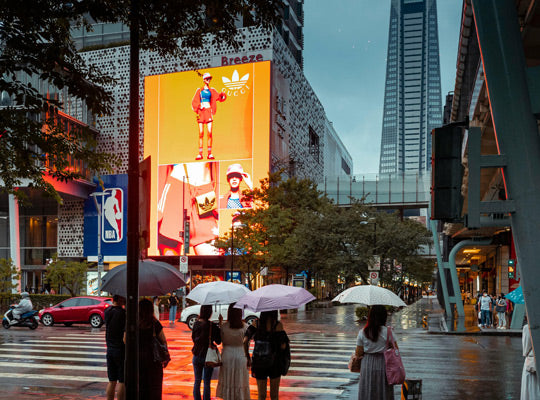
LED displays feature infinite contrast potential because they can turn a pixel completely off ($0$ nits). This is the key to High Dynamic Range (HDR). By following HDR10 or Dolby Vision standards, LED screens can show blindingly bright highlights alongside deep, inky shadows, creating a three-dimensional visual impact that LCDs simply cannot replicate in a brightly lit mall.
5. Spectral Purity & Color Accuracy
LCD backlights often lean toward the "cool" (bluish) side of the spectrum to achieve higher perceived brightness, which is why they can look "colder" in person. Furthermore, as LCDs age, the yellow phosphor in the backlight degrades at a different rate than the liquid crystal, leading to Color Drift.
Direct-View LEDs allow for Pixel-by-Pixel Calibration. Engineers can calibrate each diode's luminance and chromaticity to ensure 99% uniformity across the entire wall. This level of precision is why LED is preferred for high-end professional environments where color accuracy is non-negotiable.
6. Viewing Angles & Optical Uniformity
LCD light is highly directional due to the internal polarization layers. When you move to the side of an LCD panel, you experience Gamma Shift—colors change, and brightness drops. This is a major drawback for large meeting rooms or public spaces.
LEDs (specifically SMD or COB types) emit light in a wide, hemispherical pattern. Following the SJ/T 11141-2017 industry standard, quality LED screens maintain consistent color and brightness even at 160-degree angles. Everyone in the room gets the "best seat," seeing the same vibrant image regardless of their position.
7. Environmental Adaptation
In a shopping mall with large windows, the ambient light can be 2,000 nits or higher. A typical LCD (350-700 nits) looks like it's "washed out" because it can't compete with the sun. LED displays can easily reach 5,000 to 10,000 nits if needed. Even at lower indoor brightness, the high peak luminance of LED ensures the content remains punchy and readable against glare.
8. Final Professional Summary
| Technical Aspect | LED Display (Self-Emissive) | LCD Display (Backlit) |
|---|---|---|
| Light Source | Active RGB Diodes | Passive Backlight + Shutter |
| Color Standard | Up to Rec.2020 | Mostly Rec.709 |
| Black Levels | True Black (Off) | Dark Gray (Light Leakage) |
| Response Time | Microseconds (μs) | Millisecond (ms) |
| Visual Perception | Vibrant, Deep, Consistent | Cooler, Flatter, Angle-sensitive |
In conclusion, while LCD technology is cost-effective for small-scale, static applications, the Direct-View LED is superior in professional, high-impact environments. Its ability to deliver high-purity color, instantaneous response, and infinite contrast is what makes it "look better" to the human eye.
Authoritative Standards & References
- International Telecommunication Union: ITU-R BT.2020 - UHD Parameter Values
- IEC Webstore: IEC 62341: Fundamental Emissive Display Specs
- Society for Information Display: SID Industry Standards for Display Measurement
- VESA: High Performance Monitor Compliance (HDR)


Partager:
Celebrating Our Team: Monthly Birthday Gathering at VMX Visual
Christmas Greetings from VMX Visual